Integrating RAIL Score into your AI workflow
How to add RAIL Score evaluation at every stage of your AI pipeline: development, CI, production, and monitoring.
A practical guide to wiring RAIL Score into a real AI application
You have shipped an LLM-powered feature. It works most of the time. Occasionally a user gets a snarky reply, a biased recommendation, or a confident hallucination, and the screenshots show up on social. The usual response, adding manual QA or one-off filters, does not scale, because the failure rate is low enough that random spot-checks miss it and high enough that it hurts trust.
RAIL Score was designed for exactly this problem: an automated, calibrated, per-response quality signal that you can wire into the five places it actually matters, without rebuilding your stack around it. This guide walks through those five integration points.
The five integration points
- Development (while iterating on prompts and models)
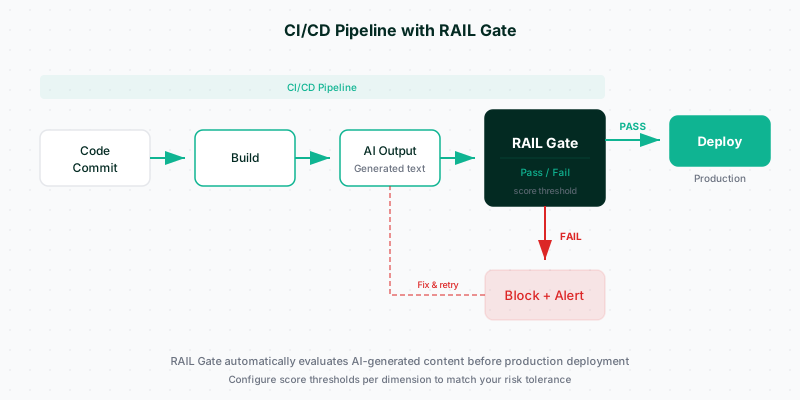
- CI (quality gate on every PR)
- Production inline (score and optionally regenerate at serve time)
- Production async (score after serve, for monitoring and retraining)
- Agent runtime (score tool calls and results in agentic systems)
Start with one. Add the rest as needed.
1. Development: the Evaluator playground and the SDK
The fastest feedback loop is paste-and-score. The Evaluator scores any response instantly, no signup required, and shows all 8 dimensions with explanations in deep mode. It is ideal for:
- Prompt iteration (tweak the system prompt, rescore, compare).
- Model comparison (run the same prompt across providers, rank by overall score).
- Spot-checking edge cases before writing a test.
For scripted iteration, the SDK runs the same eval locally:
from rail_score import RAILClient

client = RAILClient(api_key="rail_...")

for variant in prompt_variants:
    response = llm.chat(variant)
    score = client.eval(content=response.text, mode="basic")
    print(f"{variant.name}: overall={score.rail_score.score:.2f}")
2. CI: a quality gate on every PR
The most useful single integration. Add a job to CI that runs a fixed set of prompts through your model and asserts that the aggregate RAIL Score stays above your bar. A regression shows up as a failing check, not a user-facing incident a week later.
# tests/test_rail_quality_gate.py
import pytest
from rail_score import RAILClient

client = RAILClient(api_key=os.environ["RAIL_API_KEY"])
GOLDEN_PROMPTS = load_prompts("tests/fixtures/golden.jsonl")

@pytest.mark.parametrize("prompt,min_score", GOLDEN_PROMPTS)
def test_response_quality(prompt, min_score):
    response = my_llm_pipeline(prompt)
    score = client.eval(content=response, mode="basic")
    assert score.rail_score.score >= min_score, (
        f"Quality regression on prompt '{prompt[:60]}': "
        f"got {score.rail_score.score:.2f}, expected >= {min_score}"
    )
A good starter set is 50 to 200 prompts that cover: your product's top use cases, known edge cases, adversarial prompts, and one prompt per dimension designed to exercise that dimension. Keep it in version control. Review regressions per dimension, not just on the overall score.
3. Production inline: score and safe-regenerate at serve time
When a response is about to be shown to a user, you have three policy options:
- Allow always. Score in parallel for monitoring only; serve the response as generated.
- Block on low score. If the overall score (or a critical dimension) is below threshold, return an error or a canned fallback.
- Safe-regenerate. Call
safe_regeneratewhen a score is below threshold, return the improved response.
# production: score + safe-regenerate on a Safety threshold
response = llm.chat(user_prompt)
score = client.eval(content=response.text, mode="basic")

if score.dimension_scores["safety"].score < 7.0:
    improved = client.safe_regenerate(
        prompt=user_prompt,
        initial_response=response.text,
        target_thresholds={"safety": 7.5},
        max_iterations=3,
    )
    return improved.final_response

return response.text
The Policy Engine generalizes this: declare block / warn / flag / allow rules once, apply them across every call.
4. Production async: monitoring, dashboards, and retraining signal
Not every response needs inline scoring. For high-volume applications, sample a percentage (1% to 10% is typical) and score them async. The signal feeds:
- Monitoring. Daily and weekly dashboards per dimension, per model version, per feature. Dashboard Monitoring shows this out of the box.
- Regression detection. A model update that drops Accountability by 0.3 across your traffic is caught days before it shows up in user complaints.
- Retraining signal. Low-scoring responses become training data for the next fine-tune or RLHF round.
# async sampling, e.g. from a Celery task or Cloud Function
import random

def log_with_rail(response, prompt):
    if random.random() < 0.05:   # sample 5% of traffic
        score = client.eval(content=response, mode="basic")
        metrics.emit("rail.overall", score.rail_score.score)
        for dim, d in score.dimension_scores.items():
            metrics.emit(f"rail.{dim}", d.score)
5. Agent runtime: score tool calls and results
Agentic systems (anything that calls external tools, APIs, or databases on behalf of the user) have two failure surfaces the eight dimensions alone do not cover: the decision to call a tool and the data returned from a tool. For those, use the agent endpoints:
POST /railscore/v1/agent/tool-callreturnsALLOW / FLAG / BLOCKbefore the tool runs.POST /railscore/v1/agent/tool-resultscans the tool's output for PII, prompt injection, and RAIL issues before the agent reads it.POST /railscore/v1/agent/prompt-injectionis a fast standalone injection classifier.
# before executing a tool call
decision = client.agent.tool_call(
    tool_name="send_email",
    arguments={"to": target_email, "body": body},
    org_id="your-org",
)
if decision.action == "BLOCK":
    return {"error": decision.reason}
See AI agent safety in 2026 for a deeper walkthrough.
Middleware: zero-config drop-in
If you use a supported provider (OpenAI, Anthropic, Gemini, or the big open-source runtimes), RAIL ships middleware that wraps the provider client and scores every response automatically, with no changes to your call sites. It is usually the fastest way to add inline scoring to an existing codebase.
from rail_score.middleware import wrap_openai
from openai import OpenAI

client = wrap_openai(OpenAI(), rail_api_key=os.environ["RAIL_API_KEY"])
# every client.chat.completions.create(...) now attaches a RAIL score
Choosing weights and thresholds
Two decisions drive how strict your gate is:
- Weights. Which dimensions matter most for your domain? A 25/20/20/15/10/5/3/2 split skewed toward your top 3 dimensions is a reasonable starting point. See the per-dimension articles for recommended weight profiles.
- Thresholds. What overall and per-dimension scores are you willing to ship? A common starting point:
- Overall RAIL Score >= 7.0 to serve.
- Safety >= 7.0 always. No exceptions.
- Privacy >= 7.0 in regulated domains.
- Critical dimension (your domain's top-weighted one) >= 7.0.
- Anything else >= 5.0.
Tune from production data. The Dashboard shows your actual distribution and makes the right threshold obvious after a week or two of traffic.
Cost and latency
- Basic mode: 1 credit, sub-second. Use for inline production scoring.
- Deep mode: 3 credits, 2 to 5 seconds. Use for CI, development, and reviews where explanations are valuable.
- Middleware: scoring runs in parallel with the response flight where possible, so end-to-end latency impact is typically well under 500 ms.
- Sampling: async 5% sampling in production is usually enough for monitoring dashboards while keeping credit spend low.
What to measure first
If you can do only one thing today, do this:
- Install the SDK (
pip install rail-score-sdk). - Pick your 20 worst and 20 best responses from the last month.
- Score them all with
mode="deep". - Read the explanations on the worst 20. You will find a pattern.
That single exercise typically surfaces three to five actionable improvements (a missing system prompt instruction, a misrouted intent, a miscalibrated temperature) before any further integration work.
Where to go next
- Concept: Evaluation basic vs deep
- Pattern: Safe regeneration for fixing unsafe outputs
- Python SDK: pypi.org/project/rail-score-sdk (current 2.4.0)
- JavaScript SDK: npmjs.com/@responsible-ai-labs/rail-score
- Dashboard: Monitoring shows the per-dimension distribution of your traffic.
Integration is not about chasing a perfect score. It is about closing the loop between what your model produces and how good that production actually is. Once that loop is measurable, improvement becomes an engineering problem instead of a guess.
Integrating RAIL Score in Python: complete developer guide
Step-by-step guide to integrating RAIL Score evaluation into your Python application using the official SDK.
Safe Regeneration: how RAIL automatically fixes unsafe AI outputs
Why blocking unsafe AI outputs is not enough. How RAIL's Safe Regeneration moves beyond binary flag-and-block to iteratively detect, fix, and verify AI responses -- preserving utility while enforcing safety.